Run boosted AI agents.
Fearlessly.
DevCage doesn't just cage AI coding agents — it makes them better.
Hardened Docker containers with dropped capabilities,
network isolation, and zero-trust defaults protect your system. An enhanced system prompt gives every agent structured
work cycles, security-first patterns, and a mandatory definition-of-done checklist — plus a comprehensive toolset ready to use.
Safer for you. Smarter for them.
Introduction in 1 minute
Download DevCage v0.9.5
Windows or macOS with Docker Desktop recommended.
No admin privileges required.
Windows
Windows 10 or 11
One-click installer. Adds devcage to PATH and Explorer context menu integration.
macOS
macOS 10.15+ (Catalina or later)
Standard macOS installer package. Adds devcage to PATH and Finder Quick Actions.
Portable
Windows 10+ / macOS 10.15+ / Linux
Extract and run ./devcage.sh or devcage.bat from any directory.
Windows installer note: The .msi installer may be temporarily flagged by Windows Security's Smart App Control until it gains enough download traction — it is not yet code-signed. In case of problems — to install, temporarily disable Smart App Control in Windows Security › App & browser control › Smart App Control settings, then re-enable it after installation. Alternatively, use the Portable .zip, which has no such restriction.
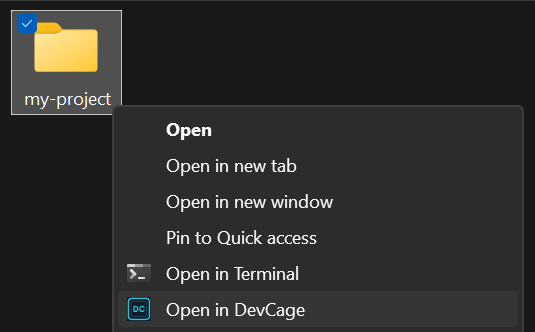
Right-click any folder.
Launch instantly.
The Windows installer adds Open in DevCage directly to Explorer's context menu. No terminal, no typing — right-click a project folder and you're inside a hardened sandbox in seconds.
Desktop Launcher
A native desktop UI that puts every DevCage option at your mouse.
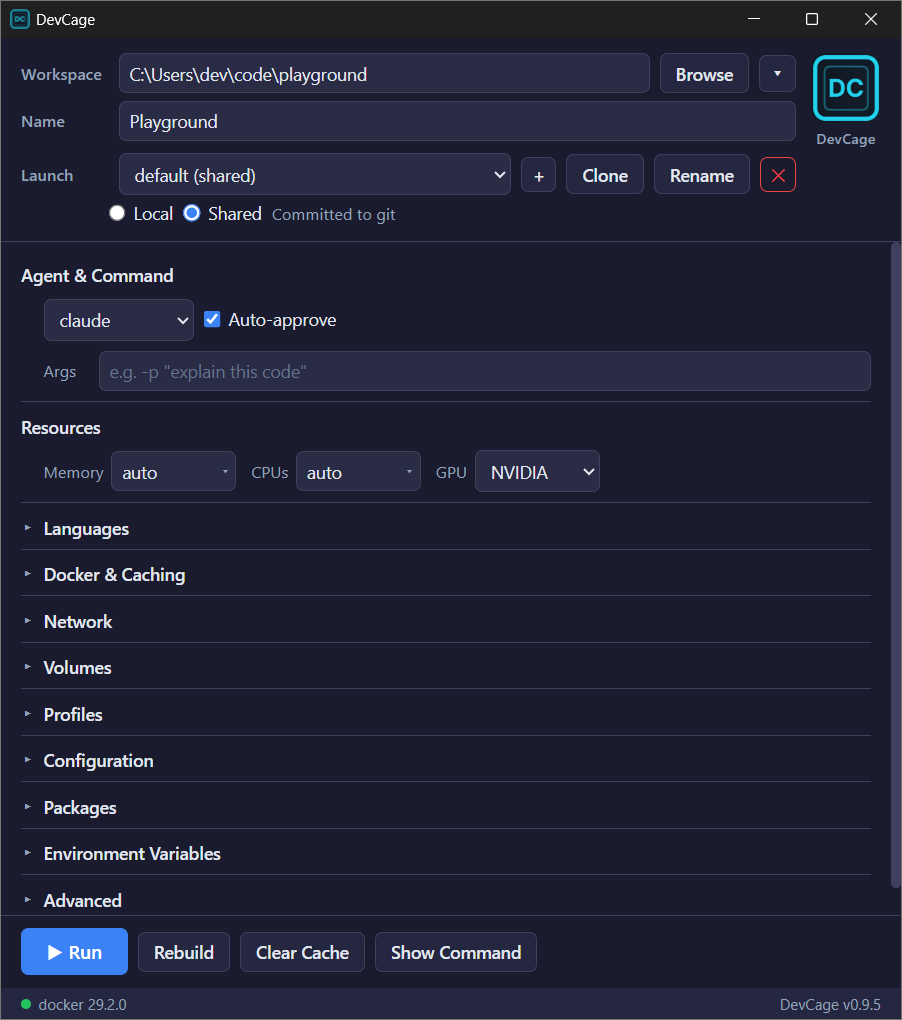
Point. Click. Launch.
Choose your workspace, pick an agent, tweak resources, languages, volumes, and environment variables — all from a clean, dark-themed UI. Save launch configurations, clone them per project, and hit Run. The Launcher generates the full CLI command under the hood so you never have to memorize flags again.
Quick start in three steps
No global installs, no admin privileges, no configuration files to write.
Install
Prerequisites
Install Docker Desktop or Podman Desktop.
DevCage itself
Then download and install DevCage.
Launch an agent
Pick any AI agent. It will be installed automatically on first use.
Customize
Pin versions, set resource limits, enable GPU, or add packages.
Many agents.
One sandbox.
Switch between AI coding tools instantly.
Each is lazily installed on first use — no image bloat and up-to-date.
Claude Code
Gemini CLI
Codex CLI
Copilot CLI
Aider
Goose
or install anything else normally
Why sandboxing matters
AI coding agents need deep access to work — file I/O, shell execution, network calls, package installs. That power is exactly what makes running them on bare metal dangerous.
When you launch an AI agent on your workstation, you hand it your user-level privileges: every file you can read, every host you can reach, every credential stored in your profile. The agent doesn't need to be malicious — a single hallucination, prompt injection, or compromised dependency is enough to cause real damage. Sandboxing is not optional — it's a baseline.
File & Credential Protection
An unsandboxed AI agent can read far beyond your project: credentials, API tokens, private keys, and personal files. DevCage restricts the agent's view to your project directory — nothing else. Your secrets and other projects remain invisible.
LAN & Internal Network Defense
Your workstation sits inside the home or corporate network. A compromised agent could probe routers, NASes, internal services, access databases, or exfiltrate source code — all from a trusted machine. DevCage blocks all LAN traffic while keeping internet access for legitimate needs. Your internal network stays unreachable.
Hallucination Containment
AI agents don't just give wrong answers — they take wrong actions with full confidence.
A hallucinating agent might delete files, overwrite configs, or run destructive commands.
On bare metal, the blast radius is your entire machine. Inside DevCage, the worst case is a corrupted workspace
you can git reset. Your OS, other projects, and system configuration remain untouched.
Supply Chain Attack Mitigation
AI agents routinely install packages — creating a direct vector for supply chain attacks: typosquatted packages, compromised accounts, malicious install scripts. On bare metal, a rogue package runs with your full privileges. Inside DevCage, malicious code is contained in an isolated environment — it cannot access the host, reach the local network, or escape.
Security & power.
Active by default.
Every default is a secure default. Seven hardened layers protect your host while GPU passthrough, cross-platform support, and professional dev tools keep you productive.
Defense in Depth
All Linux capabilities dropped. Temporary init caps permanently cleared via setpriv before any user code runs. No-new-privileges enforced.
Network Isolation
LAN traffic blocked via iptables so agents can't reach your local network. Full internet access is preserved for package installs, API calls, and git operations.
GPU Passthrough
NVIDIA and AMD GPU support via compose overlays.
Cross-Platform
Native launchers for macOS, Linux, and Windows. Finder Quick Actions and Explorer context menus.
Docker-in-Docker
Agents can build images, run containers, and compose multi-service apps autonomously — through a TLS-isolated DinD sidecar, never the host socket.
Version Pinning
Pin exact tool versions in versions.conf for reproducible builds. Mixed pinned + latest supported.
Lazy Installation
AI tools installed on first use via wrapper scripts. Small base image, fast builds.
Config Protection
Agent configs are mounted read-only by default and overlay-copied into the container. Write access is opt-in.
Package Caching
Named Docker volumes persist Maven, npm, pip, Cargo, Go, Gradle, and SDKMAN caches across sessions.
Container Boundary
Workloads run inside Docker with no direct host access
Capability Dropping
All Linux capabilities dropped; cleared again on privilege drop
Privilege Restriction
no-new-privileges prevents any escalation
Unprivileged User
devcage user with host-matched UID, never root
Network Isolation
iptables blocks LAN traffic; internet stays open
Config Protection
Agent config dirs mounted read-only by default
Socket Isolation
Host Docker socket never mounted; TLS DinD sidecar used
Verify with one command
Built-in audit commands scan your project dependencies and the sandbox itself — no setup, no configuration.
Project Audit
audit
Scans your project for dependency vulnerabilities, code security issues, and committed secrets. Auto-detects package managers and runs the right checks.
$ audit --fix # auto-fix where possible
$ audit --level critical --no-semgrep
Sandbox Audit
audit-sandbox
Verifies that the sandbox itself is properly hardened.
$ audit-sandbox --level critical
$ audit-sandbox --no-trivy
Batteries included
Ubuntu base with multiple programming language runtimes, all major package managers, and professional-grade tools — everything an AI agent needs to build, test, and ship software.
Languages & Runtimes
Package Managers
Semgrep
Static analysis security scanner. Find vulnerabilities, enforce code patterns, and run custom rules across 30+ languages. Catches OWASP Top 10 issues before they ship.
Trivy
Scan containers, filesystems, and dependencies for known CVEs. Generate SBOMs, check license compliance, and detect misconfigurations in Dockerfiles and IaC templates.
Playwright + Chromium
Full browser automation with real Chromium pre-installed. Run E2E tests, take screenshots, validate UI rendering across viewports, and interact with pages programmatically.
Lighthouse
Audit web pages for performance, accessibility, SEO, and best practices. Generate scores with actionable recommendations to optimize Core Web Vitals and WCAG compliance.
wrk
HTTP load testing and benchmarking. Measure request throughput, latency percentiles, and connection handling under sustained concurrent load.
Mailpit
Local SMTP server that captures all outgoing email. Web UI for inspecting messages, testing email workflows, and validating templates — without sending real mail.
Agents are smarter inside the cage
Every agent receives an enhanced system prompt — a full development methodology with first principles, structured work cycles, anti-pattern tables, and a definition-of-done checklist.
It turns AI agents from unreliable code generators into disciplined software engineering assistants.
Disciplined work cycle
Agents follow a structured loop: understand, baseline, change, verify, review, iterate. Tests run before and after every change — not just at the end. Three failed attempts trigger a step-back and re-analysis.
Security-first by default
Proactive security scans after every dependency change. Parameterized queries enforced, hardcoded secrets rejected, input validated at API boundaries. Agents know the OWASP Top 10 wrong/right patterns by heart.
Measure, don't guess
Playwright screenshots before and after every UI change at multiple viewports. Lighthouse for performance and accessibility scoring. wrk for API load testing. Visual regressions and performance issues are caught, not shipped.
Production-grade patterns
Connection pooling, N+1 query prevention, proper HTTP status codes, structured logging, dependency isolation, atomic git commits. Agents are taught concrete wrong/right examples for every common mistake — from SQL injection to swallowed errors.
Real services, not mocks
The DinD sidecar gives agents PostgreSQL, Redis, MongoDB, and MySQL on demand. Integration tests run against real databases with proper migrations — not in-memory fakes that mask production bugs.
Definition of Done
A mandatory checklist before claiming work is complete: tests pass, linter clean, security scanned, screenshots taken, git diff reviewed, no debug statements, every requirement addressed. "Should work" is not verification.
Three levels, full control
Configuration cascades through three levels — global, user, and project — with later levels overriding earlier ones. Activate profiles for environment-specific overrides. CLI flags override all.
(global) config/* → (user) ~/.devcage/config/* → (project) .devcage/config/*
Persistent Defaults
Set memory limits, CPU count, default ports, and flags. Key=value merge — later levels override. CLI wins over all.
Version Pinning
Pin Node.js, Java, Go, Rust, .NET, and 30+ tools to exact versions. Per-project overrides for reproducible builds.
Startup Script
All found scripts sourced in order (global → user → project). Project-level requires confirmation.
Environment Variables
KEY=VALUE pairs injected into the container. Multiple levels stack — later values override. CLI --env wins over all.
Scheduled Tasks
Cron entries concatenated from all levels and installed as the unprivileged user’s crontab. Project-level requires confirmation.
Agent Instructions
Custom instructions appended to the base sandbox guide and symlinked to every AI tool’s expected location.
Profiles
Sibling directories with environment-specific overrides. Activate with -P or --profile. Combinable — config.test.cluster1/ matches when both are active.
CLI flags at a glance
Every option has a sensible default. Override only what you need.
Ready to cage your agents?
One command. Full isolation.
Comprehensive AI coding toolbox without worries.